 UnscrambleTheWord.co


Why daily word game answers refresh the way they do
Daily word game answers refresh on a fixed server schedule, not your device’s clock. Games like New York Times Wordle push a new puzzle once per calendar day based on server time, and your browser or app simply fetches that update when you load the game. When everything works, you never notice the process. When it breaks, you’re staring at yesterday’s puzzle wondering what went wrong.
Here’s what controls the refresh cycle:
- Server schedule: The game server publishes a new puzzle at a set time. Wordle and most daily puzzles follow a once-per-day cadence tied to server time, not your local midnight.
- Browser cache: Your browser stores a snapshot of the page. A standard reload often serves that snapshot instead of fetching fresh data from the server.
- App state: Mobile apps sync progress between local storage and the cloud. A backgrounded app may not pull the new puzzle until you fully close and reopen it.
- Device clock: If your phone’s date or time is wrong, the game server may serve the previous day’s puzzle because it thinks you’re still in yesterday’s window.
- Internet connection: A weak or dropped connection interrupts the data fetch entirely, leaving the old puzzle on screen.
Wordy Solver covers daily puzzles for Wordle, Connections, Strands, and Spelling Bee, so if your game is stuck, you can always check there for today’s confirmed answer while you troubleshoot.
What causes word game answers to get stuck or not update?
Most refresh failures trace back to one of a handful of technical culprits. Knowing which one you’re dealing with cuts your troubleshooting time in half.
- Aggressive browser caching: Browsers cache puzzle pages to load them faster. That cached version can persist for several minutes after the official puzzle update time, so you see an outdated puzzle even though the new one is live on the server.
- Time zone mismatch: Blossom Word Game, for example, resets at midnight Eastern Time, which is 9:00 PM Pacific the night before. Players who expect a midnight local reset are often confused when the puzzle changes hours earlier or later than anticipated.
- Device clock errors: An incorrect date, time, or time zone on your device can cause the game server to serve the wrong day’s puzzle. This is more common after international travel or a failed automatic time sync.
- Background app state: App-based games store progress locally and sync with the cloud. Version mismatches or background app state often delay puzzle updates until the app is fully restarted.
- Server maintenance or game updates: Developers occasionally push word list updates or replace puzzle solutions to remove problematic terms. During those windows, puzzles may appear inconsistent across regions or devices.
- Poor internet connection: A slow or interrupted connection prevents the app from completing the data fetch, leaving the stale puzzle displayed.
How to manually refresh and fix a stuck word game puzzle
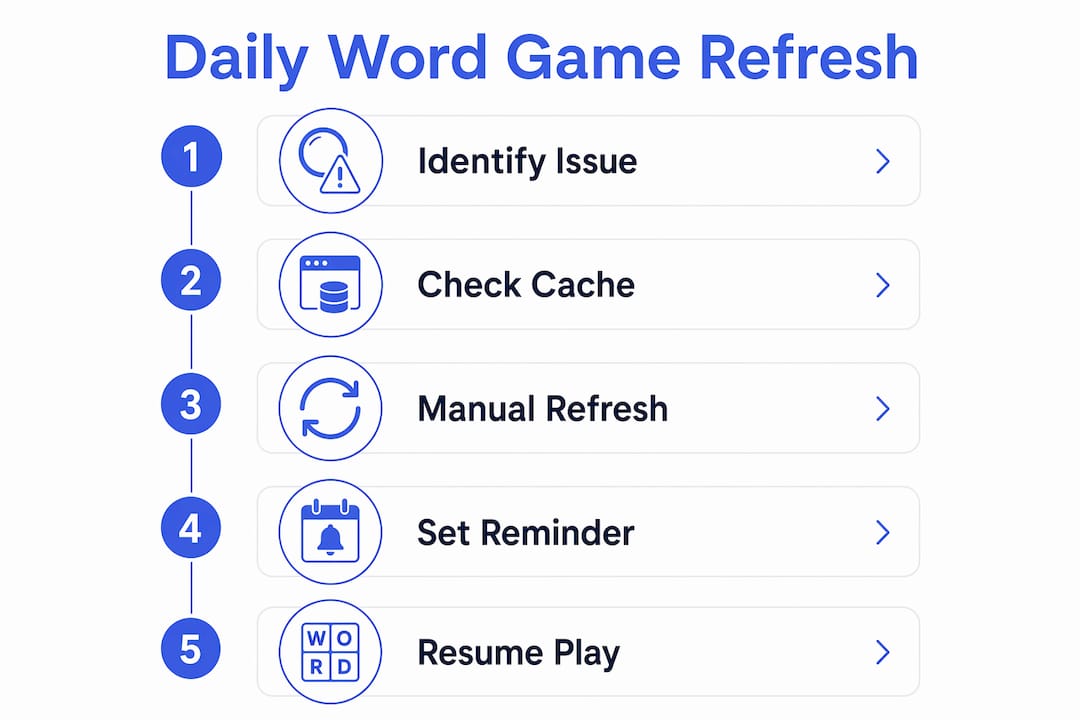
When your puzzle won’t update on its own, these steps fix the problem the vast majority of the time. Work through them in order.
-
Force-close and reopen the app. On iOS, swipe up from the bottom and swipe the app card away. On Android, use the recent apps button and swipe it off. Reopening triggers a fresh server sync and resolves most mobile refresh failures.
-
Run a hard refresh in your browser. A standard F5 or Cmd+R reload often just reloads the cached page. Use Ctrl+Shift+R on Windows or Linux, or Cmd+Shift+R on Mac, to bypass cached data and pull the current puzzle directly from the server.
-
Clear your app cache. On Android: Settings > Apps > [your game] > Storage > Clear Cache. On iPhone: Settings > General > iPhone Storage > tap the app > Offload App, then reinstall. Be aware that clearing full app data can reset your progress in some games, so clear cache only, not data, when that option is available.
-
Check your device date, time, and time zone. Go to your device’s date and time settings and confirm automatic time is enabled. An incorrect device time is one of the most overlooked causes of stale puzzles, especially after travel.
-
Test your internet connection. Switch between Wi-Fi and mobile data to rule out a network issue. If the puzzle loads correctly on one connection but not the other, the problem is your network, not the game.
-
Check for server outages. Visit the game’s official social media accounts or community forums. Developers post maintenance windows there, and player communities often report widespread refresh issues within minutes of them starting.
-
Delete and reinstall the app as a last resort. This resets the local cache completely. For games that store progress in the cloud, like Microsoft Ultimate Word Games, your stats survive the reinstall. For games without cloud saves, deleting the app means starting over, so confirm your save situation first.
Pro Tip: Know the difference between refreshing a daily puzzle and restarting a level. In WordBrain, for instance, the restart button resets the level layout but does not wipe your overall game progress. Refreshing a daily puzzle, by contrast, fetches a new puzzle from the server. Mixing these up can cost you a streak.

What the word gaming community says about using refreshes
The community is genuinely split on refreshes, and the debate is more interesting than you’d expect. On Steam’s Word Play forums, players openly discuss whether using a refresh is a strategic move or a sign of defeat. The honest answer: it depends entirely on how you play.
- Refreshes as a learning tool: ESL players consistently report that reloading a board when they’re stuck helps them learn new vocabulary, because the new board often contains words they recognize even if the previous one didn’t.
- Refreshes as a strategic multiplier: Some games attach scoring modifiers to refresh usage. Players who combine refresh perks with selling modifiers report that the bonus score can scale faster than the game’s difficulty curve, particularly on easier settings.
- The mental cost argument: Several experienced players note that refreshing throws away the analysis time already spent on the current board. If you’ve studied a board deeply, refreshing means starting that mental work from scratch.
- Timing your refresh: The most effective players refresh early in a round rather than after heavy analysis, minimizing wasted effort while still benefiting from a better board.
- Streak protection: Knowing exactly when your game resets, and refreshing right after that window, keeps your streak intact while giving you a clean start on the new puzzle.
Balancing these factors is what separates casual players from players who consistently post strong scores.
When do word game answers actually update?
Each game runs on its own schedule, and knowing yours removes the guesswork entirely.

New York Times Wordle refreshes once per calendar day at midnight Eastern Time. Blossom Word Game follows the same Eastern Time anchor: midnight ET daily, which lands at 9:00 PM Pacific the night before. LinkedIn Games takes a different approach, resetting at midnight Pacific Time every day, which is 3:00 AM Eastern. That offset trips up East Coast players who expect an earlier reset.
The practical takeaway: find your game’s anchor time zone, convert it once to your local clock, and set a phone reminder. You’ll never be caught mid-session by an unexpected reset again. And if the new puzzle still isn’t showing after the reset window, a hard browser refresh or a force-close on mobile almost always pulls it through.
Key Takeaways
Daily word game answers refresh on a fixed server schedule, and most stuck-puzzle problems trace back to browser cache, device clock errors, or a backgrounded app that hasn’t synced yet.
| Point | Details |
|---|---|
| Server time controls refresh | Games like Wordle and Blossom reset at midnight Eastern Time, not your local midnight. |
| Hard refresh beats standard reload | Use Ctrl+Shift+R (Windows) or Cmd+Shift+R (Mac) to bypass cached puzzle data in browsers. |
| Force-close fixes most mobile issues | Fully closing and reopening the app triggers a fresh server sync on iOS and Android. |
| Device clock errors cause stale puzzles | An incorrect date or time zone on your device can serve yesterday’s puzzle instead of today’s. |
| Refreshes carry strategic value | Timed correctly, refreshes can protect streaks and, in some games, boost scoring modifier chains. |